Showing posts with label photo manipulation. Show all posts

Creating a Colorful Vector Based Photo Manipulation in Photoshop

Today, what we’ll learn is to stick with a theme. Sticking with the concept theme is very crucial in high-class designing. We have theme of travel (and fun, because traveling is fun), so we’ll add the elements, tone the graphic and colorize it keeping this theme in mind. I believe it will be a great inspiration for all of you.
Free photoshop cs5 tutorial

Background

Read More

100 wonderful photo effects Photoshop tutorials


How can we define what’s a photo effect? That was my main concern when I started the research to build this list. Despite of this situation, I had one thing clear: the final result had to be quite different from the orignal picture and be recognized as a post production photo manipulation.
text effects
That idea would leave all kind of complex photo retouching and subtle color correction out of the discussion. I’ve already gathered some of those tutorials in my Guide to Photoshop digital makeover and 70 horror, blood and gore photoshop tutorials and brushes articles.
Read More

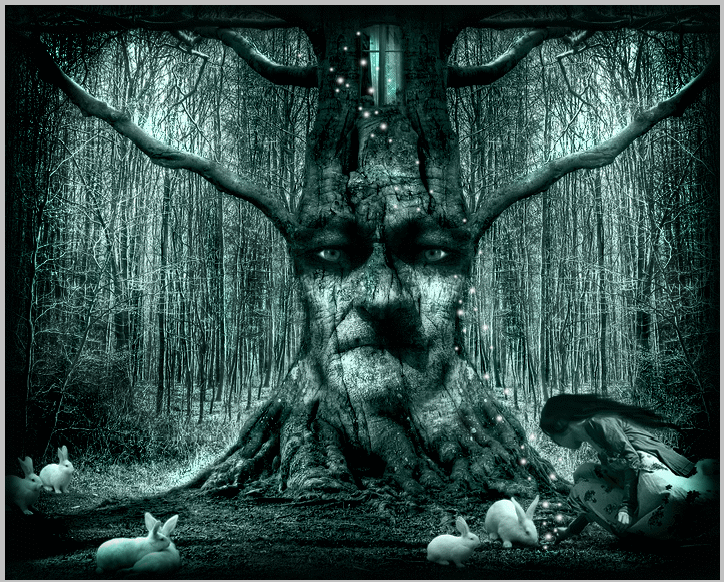
Lost Princess in the Magic Forest With Photoshop


In today tutorial I will try to create a magic scenery , a forest that unexpectedly comes to live revealing charmed trees that can talk , white rabbits and magic light sparkles . .....

Preview Final Image

lost-princess-in-the-magic-forest tutorial intermediary image
Magic Forest – Fantasy Fairy Tale Photo Manipulation
Read More

Create a Surreal Out of Bounds Photo Manipulation in Photoshop


In this tutorial we will combine several images of water, animals, and people to create a surreal out of bounds photo manipulation in Photoshop. Let’s get started!

Read More

Create an Explosive Flaming Poker Card


pc_final
In this tutorial I will show you how to create your own custom poker card from scratch by using the wide variety of shapes that come with Photoshop. I will also show you techniques on how to manipulate fire by using simple methods.
Read More

Create a Beautiful Surreal Night Photo Manipulation

Create a Beautiful Surreal Night Photo Manipulation Final Image

Read More

How to Create a Fantasy Photo Manipulation

Final Image Preview

Below is the image you will create in this tutorial. Want access to the full PSD files and download able copies of every tutorial, including this one? Join Psdtuts+ PLUS for just $9/month. You can view the final image preview below or view a larger version here.

Read More

Design Summer Photo Manipulation

In this quick Photoshop tutorial I’ll teach you how to make a nice, warm, summer photo manipulation for a photo. This tutorial best works for fairly colorful, fairly bright photos. In this tutorial I will be using this stock photo of the lovely Evangeline Lilly.


Design Photo Manipulation in Summer
Design Summer Photo Manipulation


Read More

Photo Manipulation Warzone

This photo manipulation tutorial will give you an idea of how you can turn any photo into a catastrophe. This tutorial is good as an inspiration for ideas about how to manipulate your own photo in Photoshop.


Photo Manipulation Warzone Photoshop
In this tutorial i will explain step by step how to turn a regular photograph in to a warzone. I used my own photograph as original, taken on my holiday in Copenhagen:

Step 1 - Duplicate the background layer.


Read More

Design an Abstract Photo Manipulation in Photoshop CS3

Here we'll learn how to create an abstract photo manipulation that looks like you've just painted the subject, I've included lots of useful techniques for creating impressive abstract pieces. I've tried to keep this simple but if you don't understand any steps then just skip it as not all of them are compulsory.

Preview of Final Results

Below is the image we will be creating, the inspiration for this image came from an image by Maciej Mizer, a great artist, check it out from the internet.
Abstract photo manipulation

Abstract Photo Manipulation Photoshop Tutorial


Read More

Color Correcting Overlay with Photoshop

This technique produce the best results and is extremely fast and easy. Use this whenever possible for non-raw photos. 

Step 1

Download and save the following JPG file to your computer then open it inside Adobe Photoshop.
Color Correcting Overlay with Photoshop
This is one of the techniques I've developed probably over a year ago when I wasn't very good with Photoshop. It worked very well on some photos, but not on all. If you're unable to fix the white balance with the Levels technique, give this one a try.

Step 1

Download and save the following JPG file to your computer then open it inside Adobe Photoshop.
kitchen 23.94 Kb (right-mouse click> Save As)
Kitchen with Colorcast


Read More

Dark and Eerie Photo Manipulation Scene Photoshop CS2

this Photo-manipulation tutorial, we will learn how to create a dark photo manipulation scene with an eerie yet magical atmosphere. We will tackle basic techniques to create an ancient-looking room, using various stock photographs and applying adjustment layers and creating shadows using the Brush tool to blend the images seamlessly. We will also learn how to create a ghostlike creature from only one stock image using the Motion Blur tool and finally, how to create a vignette using a new layer, which you could also use in your future projects.

Preview of Final Results

How to Create A Dark and Eerie, Ancient looking Photo  manipulation scene small

Dark and Eerie Photo Manipulation Scene Photoshop Tutorial

Read More